
Whack Spin Casino in Your Pocket
We built the Whack Spin Casino app so Gates of Olympus, Evolution live tables and the sportsbook all fit on a phone screen without cramming. Balances show in AUD, TRON deposits clear quickly, and the menu stays where your thumb expects it.

The Whack Spin Casino App at a Glance
What you get when the casino and sportsbook fit in your pocket.
We built Whack Spin Casino to work on a phone the way it works on a desktop, with the same lobby, the same balance and the same games. You can open Gates of Olympus, Book of Dead or Starburst on mobile and the reels load at full size, with spin and bet controls sized for a thumb rather than a mouse pointer.
The mobile lobby holds titles from Evolution, Pragmatic Play, NetEnt and Push Gaming. Evolution's live tables stream in portrait, and the bet buttons stay clear of the dealer's hands. Slots, live casino and the sportsbook share one menu, so you can move from a blackjack table to a match market in two taps without logging in again.
Payments go through TRON, which suits mobile well: you copy a wallet address, confirm, and the deposit usually shows up within a few minutes. New players can claim a 100% welcome match from the cashier screen on their phone.
If something goes wrong, live chat opens as a panel without leaving the game. Email and Telegram are there for questions that can wait a little longer.
Mobile Site vs App: Which One Suits You
Both give you the same account, games and AUD balance. They differ in small ways.
We built the Whack Spin Casino mobile site and the app from the same account system, so your AUD balance, bonus progress and bet history follow you whichever one you open. Gates of Olympus, Book of Dead and Starburst load in both, and so do the Evolution live tables.
The differences are small, but they add up over a long session. The app keeps you logged in and can send a push alert when a match you bet on kicks off. The browser version needs no install and takes up no space on your phone. If you mostly play a few rounds while waiting for a bus, the browser is probably enough. If you follow live sports odds or play most evenings, the app saves a few taps each time.
| Feature | Mobile site | App |
|---|---|---|
| Installation | None, opens in any browser | One-off download |
| Storage used | Browser cache only | Some space on your device |
| Login | Sign in again after clearing cookies | Stays signed in |
| Push notifications | Not available | Bet results and promo alerts |
| Game library | Full catalogue | Full catalogue |
| Live casino | Evolution tables | Evolution tables |
| Sportsbook | Full markets | Full markets, faster bet slip |
| TRON deposits | Supported | Supported |
| Support | Live chat, email, Telegram | Live chat, email, Telegram |
| Updates | Automatic on reload | Through app updates |
Downloading Whack Spin Casino on Android
A short install that takes a few minutes and works on most phones from the last five years.
We built the Android version of Whack Spin Casino for people who like to play on their phone during a quiet break. You install it from our website as an APK file, not from Google Play, so your phone will ask you to approve one setting first. That is normal for real-money casino apps.
Inside, you get the same lobby as the desktop site. Gates of Olympus, Book of Dead and Starburst load quickly, and Evolution live tables keep their full-screen layout when you turn the phone sideways. The 100% welcome bonus, TRON deposits and live chat support all work the same way they do on desktop. If you have trouble during the install, our support team can also help on Telegram.
Go to Whack Spin Casino on your phone and tap the Android download button in the menu.
When Android warns you about an unknown source, open Settings and allow installs from your browser for this one file.
Open the downloaded file from your notifications and tap Install. It usually finishes in under a minute.
Launch the app, sign in with your existing account or create a new one, then claim the 100% bonus from the cashier.
Installing Whack Spin Casino on iOS
A home screen shortcut through Safari, set up in about a minute.
We don't list Whack Spin Casino in the App Store. On iPhone and iPad the app works as a web app: you add it to your home screen from Safari, and it opens full screen with its own icon, like any other app. Nothing needs to download from a third-party source, and you don't have to change any of your device settings.
Once it's installed, the shortcut loads the same lobby you see on desktop. That covers Gates of Olympus, Book of Dead and Starburst, live tables from Evolution, and the sportsbook. Updates arrive on their own the next time you open it, so you'll never see a version prompt. A small detail some people miss: use Safari for the install. Chrome and other browsers on iOS often hide the home screen option.
Go to the Whack Spin Casino website in Safari and wait for the lobby to finish loading.
It's the square with an upward arrow, at the bottom of the screen on iPhone or at the top on iPad.
Scroll down the share menu, tap the option, and keep the name or shorten it if you like.
The Whack Spin icon appears next to your other apps. Tap it to open the casino full screen.
Sign in with your account details. The session stays active, and you can turn on Face ID login in your profile settings.
Full App Features
What you get once the app is open on your phone, from the lobby to the cashier.
The app has the same slots as the desktop site. That includes Gates of Olympus, Book of Dead and Starburst, with games from Pragmatic Play, NetEnt and Push Gaming. Filters sit at the top of the lobby, where your thumb reaches them easily.
Live blackjack, roulette and game shows stream from Evolution studios. In portrait mode the dealer view shrinks a little so the betting chips stay big enough to tap without mistakes.
Sports betting uses the same balance as the casino. You can build a bet slip, check live odds and switch back to slots without logging in again or moving funds.
Deposits and withdrawals in TRON go through a short in-app flow. A QR code fills in the wallet address for you. Balances show in AUD, so you don't have to convert in your head.
The 100% welcome bonus and any active promotions have their own tab. It shows how much wagering is left as a plain number.
Live chat opens from any screen, and email and Telegram links sit just below it. Your chat history stays saved, so a question from yesterday is still there today.
Whack Spin Casino App Screenshots
Six screens from the app, from the lobby to the cashier and support.
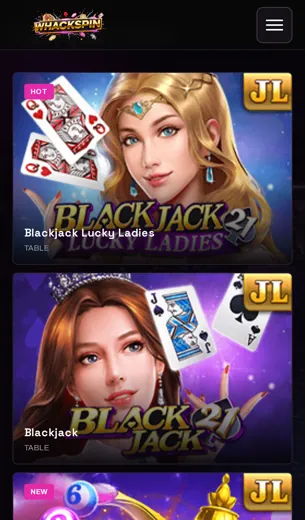
The screens below were taken from the live Whack Spin Casino app on an ordinary mid-range phone, held upright the way most people actually use it. Nothing has been polished for the occasion. You can see the lobby as it loads, with Gates of Olympus, Book of Dead and Starburst near the top, and the small search bar that sits just under the logo where your thumb finds it without much reaching.
Look at the cashier screen and you'll notice deposits run through TRON, with balances shown in AUD so you don't have to convert anything in your head. The live casino tab shows Evolution tables in a single scrolling column, and each one has its seat count and stake range printed under the thumbnail. That's an easy detail to miss.
The sportsbook sits one tap away from the slots, so you won't need a separate download. At the bottom of the menu, live chat, email and Telegram support each have their own button. The welcome screen states the 100% deposit match plainly, and the full terms are one tap further in.
First Deposit Bonus in the App
A 100% match on your first top-up, claimed from the same screen you play on.
Your first deposit at Whack Spin Casino comes with a 100% match. Put in AUD 50 and you play with AUD 100. The bonus works the same in the app as it does on desktop, so you can sign up on your phone, top up and start playing without switching to a browser.
Deposits go through TRON, which usually confirms within a minute or two. Look at the cashier screen before you send anything. It shows the minimum deposit for the offer and the wagering requirement, and both are easy to miss when you're in a hurry.
Most new players spend the bonus on slots. Gates of Olympus from Pragmatic Play and Book of Dead are popular picks, and Starburst from NetEnt has a steadier pace if you want your balance to last. Live tables from Evolution may count less toward wagering, so check the terms before you sit down at blackjack.
If anything about the offer is unclear, live chat, email and Telegram support can all be reached from the app menu.
Whack Spin App FAQ
Short answers to what players ask before they install and play on mobile.
Is there a Whack Spin Casino app for my phone?
Yes. Open our site in your phone's browser and you get the full casino, live tables and sportsbook in a layout built for small screens.
Do I need a separate account for the app?
No. One login works on mobile and desktop, and your balance and bonus progress carry across both.
Which games can I play on mobile?
The same lobby as desktop, with titles from Evolution, Pragmatic Play, NetEnt and Push Gaming. Gates of Olympus, Book of Dead and Starburst are the ones players open most.
Can I play live dealer games on the app?
Yes. The Evolution live studios stream to mobile. A steady Wi-Fi connection keeps the video smooth.
Is sports betting available on mobile?
It is. The sportsbook sits next to the casino, so you can place a bet and go back to the slots without logging in again.
What currency does the app use?
Balances are shown in AUD.
How do I deposit from my phone?
We accept TRON. Copy the wallet address from the cashier, send the amount from your crypto wallet, and the balance updates once the network confirms it.
Does the welcome bonus work on mobile?
Yes. The 100% deposit match is the same whichever device you use. Read the wagering terms before you claim it.
How do I contact support from the app?
Live chat opens from the menu. You can also reach us by email or on Telegram.
Is the app licensed?
Whack Spin Casino holds a Curaçao licence. The full details are in the licence section further down this page.
Will the app drain my battery or data?
Slots use very little. Live dealer streams use the most data, so join them on Wi-Fi if your plan is small.